Laman

Kamis, 07 Februari 2013

Cara Mengganti Kursor Di Blog

Cara Mengganti Kursor Di Blog
cara mengganti kursor di blog - Salam jumpa kembali para sahabat blogger..Pada kesempatan kali ini Pemula punya blog akan coba untuk share tutorial blog tentang cara mengganti kursor blog dengan kursor cantik ..Ok..cekidot..
Mungkin sahabat-sahabat melihat tampilan kursor yang berupa anak panah putih seperti ini sudah bosan....!!! Nah untuk sedikit variasi dan penyegaran mata ganti aja kursor pake kursor yang kita mau...nah berikut ini pemula punya blog coba memberikan beberapa alternatif yang bisa digunakan sebagai pengganti kursor tersebut dan langkah-langkah cara memasangnya diblog...Ok langsung aja ke T..K..P...
Langkah - langkah mengganti kursor yang cantik Sebagai berikut :
1. Copy script berikut ini :
<style type="text/css">
body {
cursor:url("
https://blogger.googleusercontent.com/img/b/R29vZ2xl/AVvXsEhhPSvHoWVYQz8sx4G8Wnlic346JHyDPm2Wq3rpP4l_dgp3ucDQKl5g23KIrY_r-c0aX0MYtWxonAAj0es9EfTO2U-VrI-EU2VzcyGKnyTwTsolD0vD2L-mzpN2qEkq23L6PVdlfw-mTtg/h120/1.gif")
,default}
</style>
akan menghasilkan bentuk kursor seperti ini :
Berikut ini adalah beberapa pilihan cursor yang bisa digunakan Copy script yang ada dibawah masing-masing kursor yang anda inginkan ganti tulisan yang berwarna merah :
 https://blogger.googleusercontent.com/img/b/R29vZ2xl/AVvXsEhhPSvHoWVYQz8sx4G8Wnlic346JHyDPm2Wq3rpP4l_dgp3ucDQKl5g23KIrY_r-c0aX0MYtWxonAAj0es9EfTO2U-VrI-EU2VzcyGKnyTwTsolD0vD2L-mzpN2qEkq23L6PVdlfw-mTtg/h120/1.gif

 https://blogger.googleusercontent.com/img/b/R29vZ2xl/AVvXsEgGTVLiMPHFgfegP5BursYLh9N4RVJIzrsMbHAsPQThEnzqeAl5aaSFiZRlu8NwgL4bJdaEX_XLvzFsvOT-bMSGFXdUGsloCNDMQG91NUJj1zws_3oZQhZ8Fuy5Ax96vD_iKX7-1BaAjVA/h120/2.gif

 https://blogger.googleusercontent.com/img/b/R29vZ2xl/AVvXsEj35qFR0gcXyOlUqrpzXv9yWbUcCVqslv448N9pVLrDjo08P2WdyJcoNFA5GV5dAaUPFraKkRl-lvCcRTI1pbOw4944maXp9s4jTgSVzgzECHAHe1yMcst_Op1IIgiTNjIVsH_IyE4l5IU/h120/3.gif

https://blogger.googleusercontent.com/img/b/R29vZ2xl/AVvXsEh70ngJpTi6MbfK_cCNw2zKskYh5vvda6kZZU29gIVi-GQptM7lISDxYHantX3jySjBUa8dymfvWx6chCCfqoZjd69wepDAymV3HFmNfGUpyS6tz9zJ1hLVcCZPHFnzyNcfvXlMQkJW9AY/h120/4.gif
Setelah di copy script di atas langkah selanjutnya pengaturan diblog sahabat sebagai berikut :
1. Klik Rancangan.
2. Pilih Tata letak.
3. Klik Tambah Gadget.
4. Pilih HTML/Javascript kemudian paste script tersebut.
5. Simpan dan lihat hasilnya...
Berikut ini adalah beberapa pilihan lain alamat link kursor yang bisa digunakan :
a. http://i771.photobucket.com/albums/xx357/cebol_01/Kursor.png
b. http://i34.photobucket.com/albums/d132/JuL14_ok/pinkbutterflies.gif 
c. http://i40.photobucket.com/albums/e230/dh34sy/flame.gif
d. http://i425.photobucket.com/albums/pp332/hippmibjkt/sym455.jpg
e. http://i340.photobucket.com/albums/o350/tomrat2212/emon.gif
f.  http://i872.photobucket.com/albums/ab288/bebe_munya/kursor1.gif
g. http://i872.photobucket.com/albums/ab288/bebe_munya/kursor2.gif
TIPS :
jika Anda mempunyai sidebar yang sebelah kiri jangan taruh script berikut ke widget sidebar sebelah kiri. Anda bisa menaruhnya di sidebar sebelah kanan atau lebih baik ditaruh di footer.
Demikian artikel tutorial blog cara mengganti kursor blog dengan kursor cantik semoga bermanfaat...
Juka para sahabat senang dengan artikel ini...mohon kiranya klik like [facebook] dan g+1
`

Minggu, 03 Februari 2013

10 Laptop Terunik Di Dunia


10 Laptop Terunik Di Dunia


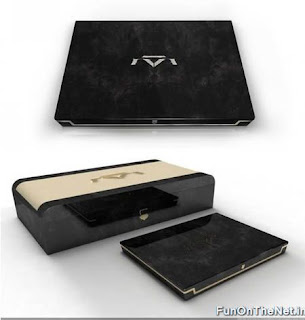
1. Laptop Million Dollar/The Million Dollar Laptop

Berbasis di Inggris,sang pencipta Luvaglio telah menciptakan laptop satu juta dolar pertama. Itulah yang pertama dari laptop mewah mereka yang akan dijual. Rincian lengkap dari laptop ini sendiri belum dirilis sampai saat ini, tetapi diketahui bahwa ia menggabungkan 17 "layar lebar serta LED dengan lapisan silau yang dirancang khusus anti-reflektif untuk gambar yang jelas dan terang, 128GB Solid State Disk space dan slot loading drive Blue-Ray. sebuah layar terintegrasi yang membersihkan perangkat dan sepotong berlian yang sangat langka berwarna perhiasan ganda sebagai tombol power ditempatkan ke dalam laptop, yang juga bertindak sebagai identifikasi keamanan.

 
2. Orkin's rolltop
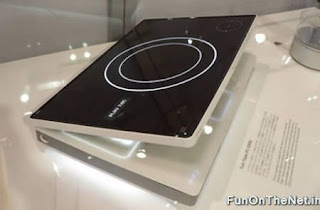
Orkin's rolltop adalah produk yang harus ada dalam daftar yang harus dimiliki oleh para laptop Geeks,Mengapa kita mengatakan demikian?"notebook" ini hadir dengan layar LED yang fleksibel yang juga berfungsi multitouch bagi mereka yang terbiasa dengan iPhone. Ketika sepenuhnya muncul,produk ini tak hanya sebagai 17 "tampilan layar datar, tetapi juga dapat dilipat menjadi 13" jika diperlukan. Tidak tahu apakah akan berfungsi pada wireless atau tidak, tetapi tampaknya laptop tersebut memiliki tablets stylus, adaptor dan port USB.


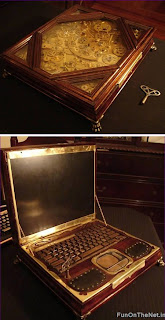
3. Datamancer's Steampunk Laptop

Sekilas tampak seperti kotak musik Victoria, namun barang ini adalah kerajinan tangan dari kayu yang rumit yang didalamnya terdapat laptop Hewlett-Packard ZT1000 yang berjalan baik dengan Windows XP dan Ubuntu Linux. fitur layar ini adalah clockworks underglass,dengan aksen ukiran kuningan , kaki cakar, keyboard dan mouse antik dari tembaga, kulit bantalan untuk pergelangan tangan, dan kartu jaringan nirkabel yang disesuaikan. Mesin menyala dengan kunci jam-berliku antik dengan cara switch ratcheting custom built dibuat dari bagian-bagian jam tua.


4. Thinkpad Reserve Edition
Ketika IBM menyerahkan semua divisi laptop mereka ke Lenovo, banyak yang takut bahwa desain Thinkpad klasik akan kehilangan arah, tetapi dengan desain yang dikembangkan ini sebagian besar orang akan terkesan dengan konsep laptop ini.


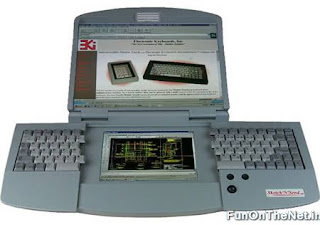
5. Ergonomis Split Dual Screen Keyboard Laptop


Hal yang terhebat dari Dual Screen ergonomis Split Portable Keyboard Notebook Personal Computer yang menakjubkan ini adalah bukan hanya karena fakta bahwa keyboard terbukanya memberikan pengguna komputer lebih banyak ruang agar pas untuk tangan mereka, tetapi bahwa ia memiliki LCD kedua yang tersembunyi di bawahnya. ide yang fantastis. Layar kedua bekerja dengan terhubung pada layar pertama - memberikan user kemampuan "drag and send" untuk membuka windows atau program, atau bertindak secara independen sebagai layar input pena untuk mencatat, membuat sketsa, dan hal-hal lain yang pengguna dapat lakukan untuk menulis di dalamnya. Hal ini membuat EDSSKN manfaat yang luar biasa tidak hanya bagi penulis dan pengolah kata, tapi seniman dan desainer juga.
 

6. HP Laptop Girly
 
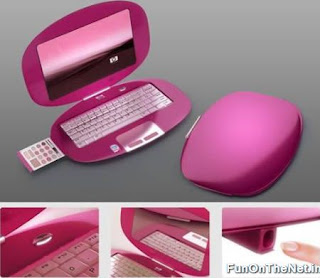
Beberapa gadis ingin perhatian lebih tidak hanya dari lelaki tetapi juga dari gadget yang juga merupakan laptop yang keren, seperti konsep-konsep HP yang dibuat khusus untuk perempuan. Setiap bagian dari laptop ini yang didesain oleh Nikita Buyanov telah memiliki kemampuan khusus sendiri yang akan mengenali dan memanjakan seorang gadis seperti yang diinginkannya.tampilan produk ini terlihat berkelas, stylish, trendi dan bahkan menyediakan produktivitas tambahan untuk kepribadian Anda. Sayangnya mereka belum benar-benar diproduksi, tapi jika cukup menunjukkan minat, mungkin tahun depan HP model feminin ini akan memberikan pandangan yang berbeda yang dibuat hanya untuk wanita.
 
 
7. Canova's Dual-Screen Laptop
Touch Dual Screen Laptop dari Canova ini adalah desain notebook terbaru yang dimaksudkan untuk pikiran kreatif. notebook ini memiliki layar ganda dengan layar sentuh yang sensitif, buku gambar, skor musik, kertas grafik, sebuah pena elektronik dan hardware khusus yang berfungsi dengan halus. Sayangnya, produk ini hanya dijual di Italia dan Australia.
 

8. Fujitsu Laptop DJ

DJ Fujitsu laptop, seperti yang disebut, memiliki layar utama LCD 20-inch yang mudah dilipat dan ditutup untuk mengaktifkan fungsi turntable, yang dapat diakses melalui layar sentuh di luar yang sensitif. Laptop ini memungkinkan Anda menelusuri semua trek favorit Anda yang sama seperti pada turntable vinyl.


9. TYPE-N01 Emergency Laptop
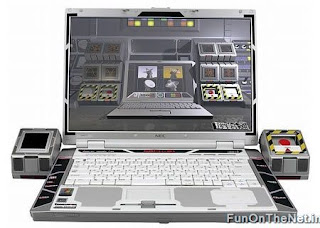
NEC telah bekerja sama dengan Takara untuk menciptakan mesin ilmuwan yang mungkin kelihatan sedikit gila, dilengkapi dengan semua token stiker, label, dan bahkan wallpaper yang membuat perangkat ini sangat mirip dengan yang terlihat di sekitar laboratorium Duke Nukem. Dengan LaVie L tipe G laptop, layar 15.4-inch. Tombol di samping adalah yang sangat diperlukan "Tombol Darurat," yang tampaknya dapat mematikan mesin jika ada penyusup yang tak terduga. Diluncurkan pada 2006, hanya 300 unit dan dibuat dengan biaya hingga ¥ 174.510 ($ 1476).


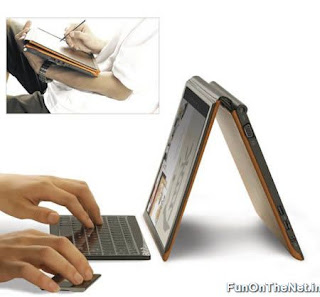
10. 2015 Compenion Laptop
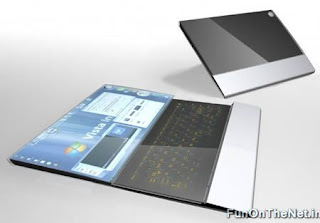
Felix Schmidberger mendesain laptop ini untuk tahun 2015 dengan layar sentuh OLED. Komputer itu sendiri memiliki OLED touchscreen, di mana Anda langsung dapat menggunakannya, mirip dengan UMPC atau PDA. seluruh Layarnya adalah slider, agar dapat digerakan ke depan untuk membuka layar OLED touchscreen kedua yang ada di bawah, di mana Anda dapat memiliki keyboard atau kontrol untuk bekerja, mirip dengan setup dengan 2 monitor.
 

Sabtu, 02 Februari 2013

script


18 Scripts

18.1 Introduction to scripts

A client-side script is a program that may accompany an HTML document or be embedded directly in it. The program executes on the client's machine when the document loads, or at some other time such as when a link is activated. HTML's support for scripts is independent of the scripting language.
Scripts offer authors a means to extend HTML documents in highly active and interactive ways. For example:
  • Scripts may be evaluated as a document loads to modify the contents of the document dynamically.
  • Scripts may accompany a form to process input as it is entered. Designers may dynamically fill out parts of a form based on the values of other fields. They may also ensure that input data conforms to predetermined ranges of values, that fields are mutually consistent, etc.
  • Scripts may be triggered by events that affect the document, such as loading, unloading, element focus, mouse movement, etc.
  • Scripts may be linked to form controls (e.g., buttons) to produce graphical user interface elements.
There are two types of scripts authors may attach to an HTML document:
  • Those that are executed one time when the document is loaded by the user agent. Scripts that appear within a SCRIPT element are executed when the document is loaded. For user agents that cannot or will not handle scripts, authors may include alternate content via the NOSCRIPT element.
  • Those that are executed every time a specific event occurs. These scripts may be assigned to a number of elements via theintrinsic event attributes.
Note. This specification includes more detailed information about scripting in sections on script macros.

18.2 Designing documents for user agents that support scripting

The following sections discuss issues that concern user agents that support scripting.

18.2.1 The SCRIPT element

<!ELEMENT SCRIPT - - %Script;          -- script statements -->
<!ATTLIST SCRIPT
  charset     %Charset;      #IMPLIED  -- char encoding of linked resource --
  type        %ContentType;  #REQUIRED -- content type of script language --
  src         %URI;          #IMPLIED  -- URI for an external script --
  defer       (defer)        #IMPLIED  -- UA may defer execution of script --
  >
Start tag: required, End tag: required
Attribute definitions
src = uri [CT]
This attribute specifies the location of an external script.
type = content-type [CI]
This attribute specifies the scripting language of the element's contents and overrides the default scripting language. The scripting language is specified as a content type (e.g., "text/javascript"). Authors must supply a value for this attribute. There is no default value for this attribute.
language = cdata [CI]
Deprecated. This attribute specifies the scripting language of the contents of this element. Its value is an identifier for the language, but since these identifiers are not standard, this attribute has been deprecated in favor of type.
defer [CI]
When set, this boolean attribute provides a hint to the user agent that the script is not going to generate any document content (e.g., no "document.write" in javascript) and thus, the user agent can continue parsing and rendering.
Attributes defined elsewhere
The SCRIPT element places a script within a document. This element may appear any number of times in the HEAD or BODY of an HTML document.
The script may be defined within the contents of the SCRIPT element or in an external file. If the src attribute is not set, user agents must interpret the contents of the element as the script. If the src has a URI value, user agents must ignore the element's contents and retrieve the script via the URI. Note that the charset attribute refers to the character encoding of the script designated by the srcattribute; it does not concern the content of the SCRIPT element.
Scripts are evaluated by script engines that must be known to a user agent.
The syntax of script data depends on the scripting language.

18.2.2 Specifying the scripting language

As HTML does not rely on a specific scripting language, document authors must explicitly tell user agents the language of each script. This may be done either through a default declaration or a local declaration.

The default scripting language  

Authors should specify the default scripting language for all scripts in a document by including the following META declaration in theHEAD:
<META http-equiv="Content-Script-Type" content="type">
where "type" is a content type naming the scripting language. Examples of values include "text/tcl", "text/javascript", "text/vbscript".
In the absence of a META declaration, the default can be set by a "Content-Script-Type" HTTP header.
    Content-Script-Type: type
where "type" is again a content type naming the scripting language.
User agents should determine the default scripting language for a document according to the following steps (highest to lowest priority):
  1. If any META declarations specify the "Content-Script-Type", the last one in the character stream determines the default scripting language.
  2. Otherwise, if any HTTP headers specify the "Content-Script-Type", the last one in the character stream determines the default scripting language.
Documents that do not specify default scripting language information and that contain elements that specify an intrinsic event script are incorrect. User agents may still attempt to interpret incorrectly specified scripts but are not required to. Authoring tools should generate default scripting language information to help authors avoid creating incorrect documents.

Local declaration of a scripting language 

The type attribute must be specified for each SCRIPT element instance in a document. The value of the type attribute for a SCRIPTelement overrides the default scripting language for that element.
In this example, we declare the default scripting language to be "text/tcl". We include one SCRIPT in the header, whose script is located in an external file and is in the scripting language "text/vbscript". We also include one SCRIPT in the body, which contains its own script written in "text/javascript".
<!DOCTYPE HTML PUBLIC "-//W3C//DTD HTML 4.01//EN"
     "http://www.w3.org/TR/html4/strict.dtd">
<HTML>
<HEAD>
<TITLE>A document with SCRIPT</TITLE>
<META http-equiv="Content-Script-Type" content="text/tcl">
<SCRIPT type="text/vbscript" src="http://someplace.com/progs/vbcalc">
</SCRIPT>
</HEAD>
<BODY>
<SCRIPT type="text/javascript">
...some JavaScript...
</SCRIPT>
</BODY>
</HTML>

References to HTML elements from a script 

Each scripting language has its own conventions for referring to HTML objects from within a script. This specification does not define a standard mechanism for referring to HTML objects.
However, scripts should refer to an element according to its assigned name. Scripting engines should observe the following precedence rules when identifying an element: a name attribute takes precedence over an id if both are set. Otherwise, one or the other may be used.

18.2.3 Intrinsic events

Note. Authors of HTML documents are advised that changes are likely to occur in the realm of intrinsic events (e.g., how scripts are bound to events). Research in this realm is carried on by members of the W3C Document Object Model Working Group (see the W3C Web Site at http://www.w3.org/ for more information).
Attribute definitions
onload = script [CT]
The onload event occurs when the user agent finishes loading a window or all frames within a FRAMESET. This attribute may be used with BODY and FRAMESET elements.
onunload = script [CT]
The onunload event occurs when the user agent removes a document from a window or frame. This attribute may be used withBODY and FRAMESET elements.
onclick = script [CT]
The onclick event occurs when the pointing device button is clicked over an element. This attribute may be used with most elements.
ondblclick = script [CT]
The ondblclick event occurs when the pointing device button is double clicked over an element. This attribute may be used with most elements.
onmousedown = script [CT]
The onmousedown event occurs when the pointing device button is pressed over an element. This attribute may be used with most elements.
onmouseup = script [CT]
The onmouseup event occurs when the pointing device button is released over an element. This attribute may be used with most elements.
onmouseover = script [CT]
The onmouseover event occurs when the pointing device is moved onto an element. This attribute may be used with most elements.
onmousemove = script [CT]
The onmousemove event occurs when the pointing device is moved while it is over an element. This attribute may be used with most elements.
onmouseout = script [CT]
The onmouseout event occurs when the pointing device is moved away from an element. This attribute may be used with most elements.
onfocus = script [CT]
The onfocus event occurs when an element receives focus either by the pointing device or by tabbing navigation. This attribute may be used with the following elements: A, AREA, LABEL, INPUT, SELECT, TEXTAREA, and BUTTON.
onblur = script [CT]
The onblur event occurs when an element loses focus either by the pointing device or by tabbing navigation. It may be used with the same elements as onfocus.
onkeypress = script [CT]
The onkeypress event occurs when a key is pressed and released over an element. This attribute may be used with most elements.
onkeydown = script [CT]
The onkeydown event occurs when a key is pressed down over an element. This attribute may be used with most elements.
onkeyup = script [CT]
The onkeyup event occurs when a key is released over an element. This attribute may be used with most elements.
onsubmit = script [CT]
The onsubmit event occurs when a form is submitted. It only applies to the FORM element.
onreset = script [CT]
The onreset event occurs when a form is reset. It only applies to the FORM element.
onselect = script [CT]
The onselect event occurs when a user selects some text in a text field. This attribute may be used with the INPUT and TEXTAREAelements.
onchange = script [CT]
The onchange event occurs when a control loses the input focus and its value has been modified since gaining focus. This attribute applies to the following elements: INPUT, SELECT, and TEXTAREA.
It is possible to associate an action with a certain number of events that occur when a user interacts with a user agent. Each of the "intrinsic events" listed above takes a value that is a script. The script is executed whenever the event occurs for that element. Thesyntax of script data depends on the scripting language.
Control elements such as INPUT, SELECT, BUTTON, TEXTAREA, and LABEL all respond to certain intrinsic events. When these elements do not appear within a form, they may be used to augment the graphical user interface of the document.
For instance, authors may want to include press buttons in their documents that do not submit a form but still communicate with a server when they are activated.
The following examples show some possible control and user interface behavior based on intrinsic events.
In the following example, userName is a required text field. When a user attempts to leave the field, the onblur event calls a JavaScript function to confirm that userName has an acceptable value.
<INPUT NAME="userName" onblur="validUserName(this.value)">
Here is another JavaScript example:
<INPUT NAME="num"
    onchange="if (!checkNum(this.value, 1, 10)) 
        {this.focus();this.select();} else {thanks()}"
    VALUE="0">
Here is a VBScript example of an event handler for a text field:
    <INPUT name="edit1" size="50">    
    <SCRIPT type="text/vbscript">
      Sub edit1_changed()
        If edit1.value = "abc" Then
          button1.enabled = True
        Else
          button1.enabled = False
        End If
      End Sub
    </SCRIPT>
Here is the same example using Tcl:
    <INPUT name="edit1" size="50">
    <SCRIPT type="text/tcl">
      proc edit1_changed {} {
        if {[edit value] == abc} {
          button1 enable 1
        } else {
          button1 enable 0
        }
      }
      edit1 onChange edit1_changed
    </SCRIPT>
Here is a JavaScript example for event binding within a script. First, here's a simple click handler:
    
<BUTTON type="button" name="mybutton" value="10">
<SCRIPT type="text/javascript">
      function my_onclick() {
         . . .
      }
    document.form.mybutton.onclick = my_onclick
 </SCRIPT>
 </BUTTON>
Here's a more interesting window handler:
    
<SCRIPT type="text/javascript">
      function my_onload() {
         . . .
      }

      var win = window.open("some/other/URI")
      if (win) win.onload = my_onload
</SCRIPT>
In Tcl this looks like:
 <SCRIPT type="text/tcl">
     proc my_onload {} {
       . . .
     }
     set win [window open "some/other/URI"]
     if {$win != ""} {
         $win onload my_onload
     }
 </SCRIPT>
Note that "document.write" or equivalent statements in intrinsic event handlers create and write to a new document rather than modifying the current one.

18.2.4 Dynamic modification of documents

Scripts that are executed when a document is loaded may be able to modify the document's contents dynamically. The ability to do so depends on the scripting language itself (e.g., the "document.write" statement in the HTML object model supported by some vendors).
The dynamic modification of a document may be modeled as follows:
  1. All SCRIPT elements are evaluated in order as the document is loaded.
  2. All script constructs within a given SCRIPT element that generate SGML CDATA are evaluated. Their combined generated text is inserted in the document in place of the SCRIPT element.
  3. The generated CDATA is re-evaluated.
HTML documents are constrained to conform to the HTML DTD both before and after processing any SCRIPT elements.
The following example illustrates how scripts may modify a document dynamically. The following script:
 <TITLE>Test Document</TITLE>
 <SCRIPT type="text/javascript">
     document.write("<p><b>Hello World!<\/b>")
 </SCRIPT>
Has the same effect as this HTML markup:
 <TITLE>Test Document</TITLE>
 <P><B>Hello World!</B>

18.3 Designing documents for user agents that don't support scripting

The following sections discuss how authors may create documents that work for user agents that don't support scripting.

18.3.1 The NOSCRIPT element

<!ELEMENT NOSCRIPT - - (%block;)+
  -- alternate content container for non script-based rendering -->
<!ATTLIST NOSCRIPT
  %attrs;                              -- %coreattrs, %i18n, %events --
  >
Start tag: required, End tag: required
The NOSCRIPT element allows authors to provide alternate content when a script is not executed. The content of a NOSCRIPT element should only be rendered by a script-aware user agent in the following cases:
  • The user agent is configured not to evaluate scripts.
  • The user agent doesn't support a scripting language invoked by a SCRIPT element earlier in the document.
User agents that do not support client-side scripts must render this element's contents.
In the following example, a user agent that executes the SCRIPT will include some dynamically created data in the document. If the user agent doesn't support scripts, the user may still retrieve the data through a link.
<SCRIPT type="text/tcl">
 ...some Tcl script to insert data...
</SCRIPT>
<NOSCRIPT>
 <P>Access the <A href="http://someplace.com/data">data.</A>
</NOSCRIPT>

18.3.2 Hiding script data from user agents

User agents that don't recognize the SCRIPT element will likely render that element's contents as text. Some scripting engines, including those for languages JavaScript, VBScript, and Tcl allow the script statements to be enclosed in an SGML comment. User agents that don't recognize the SCRIPT element will thus ignore the comment while smart scripting engines will understand that the script in comments should be executed.
Another solution to the problem is to keep scripts in external documents and refer to them with the src attribute.
Commenting scripts in JavaScript
The JavaScript engine allows the string "<!--" to occur at the start of a SCRIPT element, and ignores further characters until the end of the line. JavaScript interprets "//" as starting a comment extending to the end of the current line. This is needed to hide the string "-->" from the JavaScript parser.
<SCRIPT type="text/javascript">
<!--  to hide script contents from old browsers
  function square(i) {
    document.write("The call passed ", i ," to the function.","<BR>")
    return i * i
  }
  document.write("The function returned ",square(5),".")
// end hiding contents from old browsers  -->
</SCRIPT>
Commenting scripts in VBScript
In VBScript, a single quote character causes the rest of the current line to be treated as a comment. It can therefore be used to hide the string "-->" from VBScript, for instance:
   <SCRIPT type="text/vbscript">
     <!--
       Sub foo()
        ...
       End Sub
     ' -->
    </SCRIPT>
Commenting scripts in TCL
In Tcl, the "#" character comments out the rest of the line:
<SCRIPT type="text/tcl">
<!--  to hide script contents from old browsers
  proc square {i} {
    document write "The call passed $i to the function.<BR>"
    return [expr $i * $i]
  }
  document write "The function returned [square 5]."
# end hiding contents from old browsers  -->
</SCRIPT>
Note. Some browsers close comments on the first ">" character, so to hide script content from such browsers, you can transpose operands for relational and shift operators (e.g., use "y < x" rather than "x > y") or use scripting language-dependent escapes for ">".

kumpulan anti virus terbaik


Antivirus terbaik 2013 mulai muncul di awal tahun 2013 yang sudah dekat ini, setiap software antivirus mulai membuat fitu-fitur baru untuk menguasai pasar software keamanan ini.

Pada review antivirus terbaik 2013 kali ini, Mr. Iso akan membahas beberapa antivirus yang memang sering di gunakan oleh para pengguna PC khususnya di indonesia.

  • AVG antivirus 2013
Aplikasi AVG antivirus terbaik gratis ini memang patut diakui kehebatanya, meskipun tidak populer dengan antivirus lain tapi kemampuanya dalam menghapus, menjaga dan membersihkan virus sangat bagus dengan kinerja yang maksimal.

Antivirus AVG 2013 terbagi menjadi 2 versi yaitu AVG Free Edition dan AVG Internet Security.
  • Kaspersky antivirus
Kaspersky di buat dan dikembangkan oleh Kaspersky Lab, penjualan antivirus terbaik asal rusia di indonesia ini memang cukup banyak, meskipun antivirus kaspersky ini cukup mahal lisensinya tapi dengan fitur penuh di dalamnya seperti anti worm, anti trojan,anti phising, parental control, internet security dan lain-lain yang membuat harga yang mahal sangat pantas untuk antivirus terbaik yang satu ini.
  • ESET NOD32 Antivirus
Di indonesia Eset NOD32 belum banyak di kenal, tapi di seluruh dunia antivirus berlogo robot ini memiliki popularitas yang cukup tinggi dan layak di sebut sebagai salah satu antivirus terbaik 2013 saat ini.

Keunggulan yang di tawarkan oleh Eset NOD32 antivirus 2013 ini adalah kecepatan RTP nya yang tidak terlalu menggangu kinerja PC seperti antivirus lain.
  • McAfee Antivirus
Antivirus McAfee adalah antivirus terbaik selanjutnya yang memiliki kemampuan dalam keamanan internet, web dan parental control.

Pengaman web ini bernama Siteadvisor yang memiliki kemampuan pengecekan keamanan link lebih cepat di banding antivirus lain.
  • Smadav Antivirus
Memang antivirus indonesia ini tidaklah bisa mengalahkan antivirus terbaik sebelumnya, namun di indonesia sendiri Smadav adalah antivirus terbaik dalam menjaga komputer anda dari virus baik virus lokal dan virus luar.

Untuk mengetahui kelebihan antivirus smadav lainya silahkan baca artikel Kelebihan Antivirus Smadav


Selain 5 antivirus lain diatas, ada juga beberapa daftar Kumpulan antivirus terbaik 2013 lainya yaitu :
  1. Avira Antivirus
  2. Bitdefender Antivirus
  3. VIPRE Antivirus
  4. Panda Antivirus Pro
  5. Bullguard Antivirus
  6. Norton Antivirus
  7. Dr. Web antivirus

Itulah beberapa daftar antivirus terbaik 2013 saat ini khususnya di indonesia sendiri, untuk penggunaan antivirus dalam komputer anda sebaiknya pilihlah salah satu dari list antivirus di atas, jangan menggabungkan antivirus diatas dengan antivirus lain (Kecuali untuk antivirus smadav yang memang lebih ringan).

Apapun antivirus anda saat ini, akan lebih maksimal jika Database antivirus selalu update baik pengguna offline dan online karena virus-virus baru selalu bermunculan tiap bulanya dan tidak hanya menyebar melalui internet tapi bisa juga lewat memori tambahan sepertiFlashdisk dan Hardisk Eksternal.

Bahasa Pemrograman Terbaik


Memilih Bahasa Pemrograman Terbaik bagi Para programmer memang bukanlah suatu yang mudah, karena setiap Bahasa Pemrograman memiliki kekurangan dan kelebihan masing-masing.

Setiap programmer membutuhkan bahasa Pemrograman yang berbeda-beda tergantung kebutuhan, target platfrom dan style si programmer itu sendiri, tidak salah memang jika setiap orang boleh belajar semua bahasa Pemrograman yang ada akan tetapi hal tersebut bukanlah suatu cara yang efisien untuk Belajar bahasa Pemrograman.

Dibutuhkan setidaknya mempelajari hanya 1 sampai 2 bahasa Pemrograman saja bagi pemula untuk mempelajari bahasa Pemrograman secara efisien dimana sang programmer tersebut harus terus fokus dan memaksimalkan kemampuanya pada Bahasa Pemrograman tersebut, sehingga dibutuhkanlah pemilihan Bahasa Pemrograman terbaik yang tepat bagi programmer tersebut.

Memilih Bahasa Pemrograman Terbaik memanglah sangat susah dan mustahil dilakukan, selain karena setiap bahasa Pemrograman memiliki kelebihan dan kekurangan yang berbeda-beda juga cara sudut pandang programmer itu sendiri terhadap setiap bahasa Pemrograman.

Disini Mr. Iso akan mencoba memberikan Bahasa Pemrograman Terbaik berdasarkan banyaknya pengguna, grup dan banyaknya programmer bahasa tersebut khususnya di Indonesia

Ingat referensi ini bersifat Relatif, pendapat Mr. Iso mungkin akan berbeda dengan pendapat orang lain...!!!

1. JAVA

Pada Bahasa Pemrograman Terbaik (Terpopuler) pertama kita tempati dengan Bahasa yang dikembangkan oleh James Gosling pada tahun 1995, Bahasa JAVA ini mulai menjadi Bahasa Pemrograman yang cukup terkenal sejak kemunculanya, Bahasa yang sepenuhnya mendukung konsep OOP ini selain bisa di gunakan secara bisa gratis oleh para programmer juga bahasa ini bisa dijalankan di banyak platform yang mendukung JVM (Java Virtual Machine), Bahasa ini sangat bagus untuk dipelajari akan tetapi menurut Mr. Iso Bahasa JAVA ini sulit dipelajari oleh pemula, ada baiknya jika ingin mempelajari bahasa ini kita juga harus paham dulu tentang Konsep dasar dari PBO (Pemrograman Berorientasi Objek).

2. WEB PROGRAMING (PHP)

Bahasa Pemrograman WEB (html,css,javascript) khususnya yang menggunakan scripting PHP sebagai Bahasa Pemrogramanya menjadi salah satu pilihan Bahas Pemrograman terpopuler selajutnya, di Dunia Khususnya Di Indonesia tidak sedikit programmer yang memilih menjadi Web Programmer, selain karena PHP adalah bahasa Pemrograman yang gratis juga target platform Bahasa ini cukup luas, untuk menjalankanya pun cukup mudah, kita hanya perlu 1 server komputer baik dengan Apache atau Litespeed untuk menjalankan program di web dan sisanya hanya perangkat yang mendukung Browser dan Jaringan (baik mobile atau dekstop) untuk mengaksesnya.

Meskipun banyak sekali Bahasa yang harus kita pelajari (HTML,CSS,Javascript, Java Applet, Flash dll) untuk membuat web yang sempurna, hal ini tidak membuat web programing sesuatu yang sulit, bahkan mempelajari web programing ini bisa menjadi suatu tujuan yang sangat menjanjikan, untuk PHP, pada PHP versi 5 keatas konsep OOP sudah di dukung untuk memaksimalkan pembuatan program.

3. Visual Basic

Microsoft mengembangkan Bahasa Basic menjadi bahasa yang menggunakan GUI pada Pemrogramanya sehingga pada tahun 1991 lahirlah Bahasa Visual Basic, Bahasa milih Microsoft ini selain mudah untuk dipelajari juga memiliki banyak referensi (pustaka) yang sangat berlimpah, sayangnya target platform untuk Bahasa Visual Basic ini sangat terbatas karena tentunya dikuasi oleh Microsoft.

Bahasa Visual Basic sendiri sayangnya belum mendukung konsep OOP, barulah pada Bahasa Visual Basic .NET atau VB.NET ini sudak mendukung OOP secara penuh.

4. C/C++

C++  adalah bahasa Pemrograman yang paling umum dan biasa digunakan pada pengembangan pembuatan Game karena prosesnya sangat cepat dibanding bahasa Pemrograman lain, Bahasa Pemrograman yang dirancang dan dikembangkan oleh Bjarne Stroustrup ini menjadi bahasa Pemrograman yang banyak di gunakan sebagai acuan pembuatan bahasa Pemrograman lain seperti JAVA, PHP Dan C#, Bahasa C++ adalah bahasa Pemrograman Kelas Menengah (Middle Languange) yang membuat bahasa Pemrograman ini tidak mudah untuk dipelajari, tetapi ketika anda sudah menguasai Bahasa C++ tidak sulit bagi anda untuk memepelajari bahasa Pemrograman lain, karena sepenuhnya konsep bahasa Pemrograman paling banyak bisa dipelajari dari bahasa ini, untuk target platform bahasa C++ sangat luas karena bahasa ini juga dekat dengan Bahasa mesin.

5. DELPHI

Bagi anda yang sudah terbiasa dengan kemudahan dan penggunaan Bahasa Pemrograman Pascal, Maka Bahasa Pemrograman Delphi lah yang menjadi bahasa Pemrograman lanjutan terbaik untuk anda, meskipun Popularitas Delphi tidak sebanyak bahasa Pemrograman lain, Delphi bisa menjadi pilihan bahasa Pemrograman yang cukup menjanjikan, bahasa Pemrograman yang dikembangkan Oleh Borland ini mampu berjalan di Platform Windows dan Linux, apalagi untuk Bahasa Pemrograman Delphi pada windows sudah tersedia Delphi yang terintegrasi dengan .NET Framework atau yang disebut dengan Delphi.NET

Itulah beberapa referensi Bahasa Pemrograman Populer yang cukup menjanjikan dalam pengembanganya, selain bahasa Pemrograman yang disebutkan diatas banyak sekali Bahasa Pemrograman yang belum di sebutkan seperti C# (Seperti JAVA), LUA, Phyton, Ruby, Perl dll.

Ada banyak sekali bahasa Pemrograman, untuk memilih Bahasa Pemrograman Terbaik bukan dari bahasa Pemrograman yang di gunakan tetapi bagaimana tujuan dan bahasa Pemrograman yang paling cocok dengan masalah yang akan kita buat menjadi program, Sekali lagi Bahasa Pemrograman di atas adalah penilian yang Relatif bukan sepenuhnya benar-benar bahasa Pemrograman terbaik...!!!

Minggu, 06 Januari 2013

text area


Teks Area


Fungsi dari teks area tidak jauh beda dengan fungsi Spoiler. Keduanya adalah fitur Blogspot yang digunakan untuk menghemat tempat atau Space di postingan. Akan tetapi, teks area lebih sering digunakan untuk area atau tempat kode. Untuk memasang teks area di blog, kita tidak perlu mengedit Template. Kita hanya meletakkan sedikit kode saat menulis postingan.

Teks area sederhana

<textarea rows="6" cols="35">
Letakkan kode atau tulisan sobat disini
</textarea>

Hasilnya :


Teks Area plus tombol Copy All

<div>
<form name="copy">
<div align="center">
<input onclick="javascript:this.form.txt.focus();this.form.txt.select();" type="button" value="Copy All" /> </div>
<div align="center">
</div>
<div align="center">
<textarea cols="15" name="txt" rows="50" style="height: 100px; width: 350px;" wrap="VIRTUAL">
Letakkan kode atau tulisan sobat disini
</textarea>
</div>
</form>
</div>

Hasilnya :


Untuk memodifikasi tampilan teks area sobat, sobat blogger bisa menggunakan salah satu dari teks area berikut :

Teks area Bagian 1


Teks area Bagian 2
Teks Area Bagian 3
Teks Area Bagian 4
Teks Area bagian 5
Teks Area Bagian 6
Teks Area Bagian 7
Teks Area Bagian 8
Teks Area Bagian 9
Teks Area Bagian 10

Berikut ini kode dari kesepuluh teks area di atas :

Teks area Bagian 1

<textarea name="code" rows="3" cols="20" style="background:#BFFAFF; color:#FF0000; border-bottom: 4px solid #40FF1F; border-right: 4px solid #40FF1F; border-top: 4px solid #FFE900; border-left: 4px solid #FFE900; line-height:1.5em; padding:5px; -moz-border-radius:10px;">ISI TEKS AREA SOBAT DISINI</textarea>

Teks area Bagian 2

<textarea cols="20" name="code" rows="3" style="background: none repeat scroll 0% 0% rgb(218, 255, 191); border: 2px dashed rgb(41, 95, 0); color: #295f00; line-height: 1.5em; padding: 5px;">ISI TEKS AREA SOBAT DISINI</textarea>

Teks Area Bagian 3

<textarea cols="30" name="code" rows="6" style="background: none repeat scroll 0% 0% rgb(239, 0, 144); border: 3px dotted rgb(255, 239, 249); color: #ffeff9; line-height: 1.5em; padding: 5px;">ISI TEKS AREA SOBAT DISINI</textarea>

Teks Area Bagian 4

<textarea cols="30" name="code" rows="6" style="-moz-border-radius: 7px 7px 7px 7px; background: none repeat scroll 0% 0% rgb(251, 239, 255); border-color: rgb(202, 61, 217); border-style: solid; border-width: 1px 1px 1px 20px; color: #ca3dd9; line-height: 1.5em; padding: 5px;">ISI TEKS AREA SOBAT DISINI</textarea>

Teks Area bagian 5

<textarea cols="30" name="code" rows="6" style="background: none repeat scroll 0% 0% rgb(255, 0, 10); color: white; line-height: 1.5em; padding: 5px;"><br />ISI TEKS AREA SOBA DISINI</textarea>

Teks Area Bagian 6

<textarea cols="30" name="code" rows="6" style="-moz-border-radius-bottomright: 15px; -moz-border-radius-topleft: 15px; background: none repeat scroll 0% 0% rgb(255, 218, 175); border: 2px ridge rgb(127, 69, 0); color: #7f4500; line-height: 1.5em; padding: 5px;"> ISI TEKS AREA SOBAT DISINI</textarea>

Teks Area Bagian 7

<textarea cols="30" name="code" rows="6" style="-moz-border-radius: 5px 5px 5px 5px; background: none repeat scroll 0% 0% rgb(0, 0, 0); border: 2px inset rgb(204, 204, 204); color: white; line-height: 1.5em; padding: 0pt 7px;">ISI TEKS AREA SOBAT DISINI</textarea>

Teks Area Bagian 8

<textarea cols="30" name="Bptxt" rows="6" style="-moz-background-inline-policy: continuous; -moz-border-radius: 15px 15px 15px 15px; -moz-box-shadow: 5px 0px 8px rgb(129, 129, 129); background: none repeat scroll 0% 0% white; border-left: 20px solid red; color: black; line-height: 150%; padding: 5px;">ISI TEKS AREA SOBAT DISINI</textarea>

Teks Area Bagian 9

<textarea cols="30" name="Bptxt" rows="6" style="-moz-border-radius-bottomright: 15px; background: none repeat scroll 0% 0% yellow; border-left: 20px solid red; color: black; line-height: 1.5em; padding: 5px;">ISI TEKS AREA SOBAT DISINI</textarea>

Teks Area Bagian 10

<textarea cols="30" name=Btxt" rows="6" style="-moz-background-inline-policy: continuous; -moz-border-radius: 15px 15px 15px 15px; -moz-box-shadow: 5px 0px 8px rgb(129, 129, 129); background: none repeat scroll 0% 0% Pink; border-left: 20px solid red; color: black; line-height: 150%; padding: 5px;">ISI TEKS AREA SOBAT DISINI</textarea>